
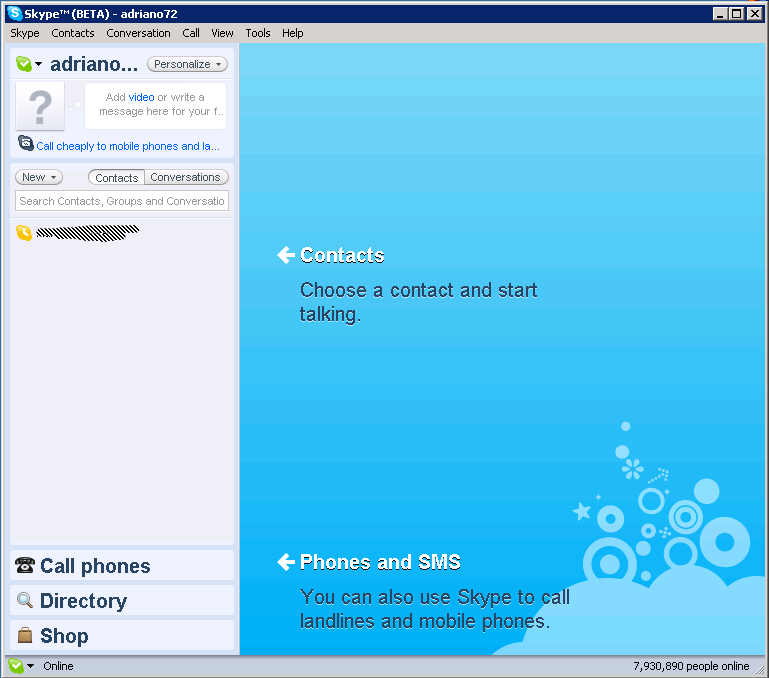
How can I take off this huge blue thing in Skype 4?
Well more than an how-to, this is a request for an how-to, assuming someone figured it out, and/or it’s even possible.
In a nutshell — I haven’t upgraded to Skype4 yet. Because of the annoying (and useless) huge window that the skype main screen has become 🙁
There is a workaround out there, with a tip suggesting how to get the conversation window out of the main screen, and then minimize (!) the main screen, but that doesn’t really solve the problem.
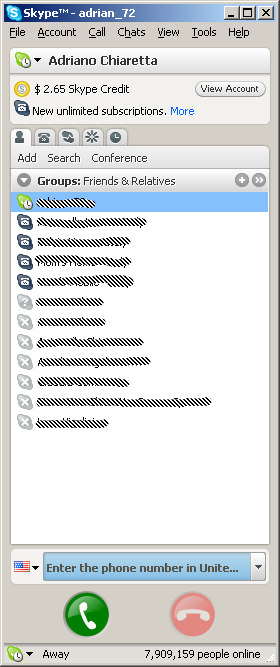
See for yourself what you get in terms of eaten up screen estate by upgrading from skype 3 to skype 4… if anyone knows how to get this huge blue thing off that would surely be of help 🙂
3 Comments
Leave a Comment


Gn & Sold
Many thanks to lOveliest @HuemansUniverse for collecting my art. Beyond happy to be part of your collection. Thank you deeply for your support Of my art.🎨💓🌱🩷
___
Haven Of chaOtic wOnder
Acrylic on canvas
10 xtz
This painting was a class work from life model that I
We’re going to be releasing a second beta version of Skype 4.0 very soon which will address the screen real estate issues in the first version – so keep your eyes peeled 🙂
thanks 🙂 I did upgrade to Skype 4 beta 2 — and I’m really enjoying it. The only thing I’m not quite in love yet is the new chat notification system — the only indicator someone sent you a message is the Skype icon in the tray bar that assumes an exclamation mark and starts jumping. Very easy to miss.
In version 3 a new chat window used to appear when someone sent an im, like it happens in most other instant messaging clients out there.
You should be able to turn on tray notifications like this – which I reckon are pretty visible 🙂