
Skype 4.1: how to disable quotes during copy-paste ops
Don’t like getting the text wrapped up in quotes when copy-pasting portion of a conversation in the Skype im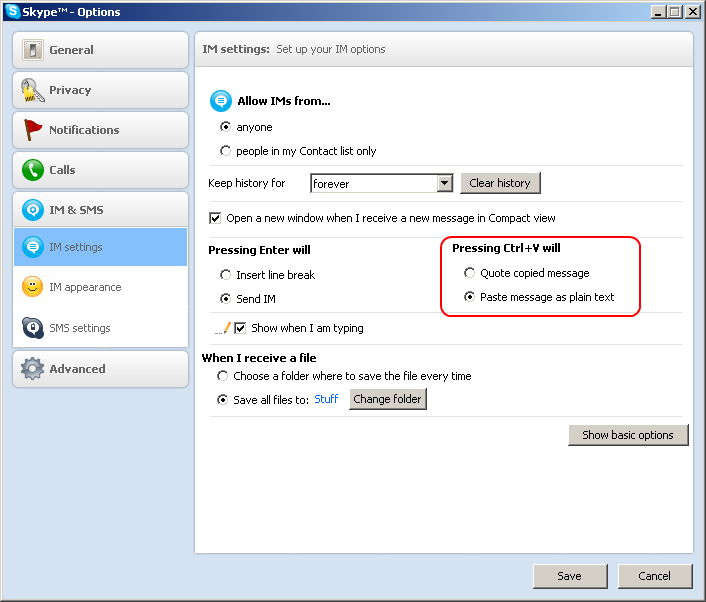 box?
box?
Here’s how to disable this behaviour, and have Skype copy-paste work as it used to prior to version 4.
In the main skype window, visit Menu Tools -> Options -> IM & SMS
Press the button “Advanced Settings”
Select “Paste Message as Plain Text”
Close the options dialog by pressing Save. Voila’, you’re done.
19 Comments
Leave a Comment


Good weekend 😊
Dear @saucebook, you have been with this collection since the first days of creating small paintings 😍
This means more than a world to me🥰
Thank you for your trust 🌹
4 editions left
https://objkt.com/tokens/KT1VHoxXoYX9LYEKe1AjPHaRq3zPZ4cZd6my/10730

My Genesis drop on @IMCollectibles_ 🖤 Already 7 ed minted 🥹 I don't know who, but really grateful to everyone who minted it🙏🥹🫶🥰🖤❣️
"KOIS"
➡️ OE/ 30 days
➡️ Only 2 $XRP
Digital Art 🎨 Link and description ⬇️
#kassiartfashion #xrp
Thanks so much for this! I was getting so annoyed with Skype every time I would paste something.
The same here. Thanks for pointing out the option!
How can I do this in a mac? Os X
Thanks a lot.
I have no idea why skype would even do something like that. A lot of frustuation.
Option doesnt work for me and a lot of other users! Still adds the persons name when copying –
http://forum.skype.com/index.php?showtopic=341871&st=0&gopid=1929401&#entry1929401
Hi – I don’t comment on many web sites but had to on yours. It’s really nice! I really like how you write – very to the point, unlike a lot of other blogs. Thanks for having this site. I’ll bookmark it and visit regularly. Keep up the outstanding work!
Thanks a lot again- this makes things WAY easier. Would love an explanation from Skype as to why they chose to make Copy/Paste so difficult. I imagine about 5% of skype users actually get around to figuring out how to fix it, which leaves 95% unable to C/P.
It worked ONCE. The next day after restarting the computer it didn’t work anymore.
Skype is just totally broken.
Copy/paste within Skype was incredibly annoying, and I salute you for finding the solution. Thank you!
Thanks for that, was getting mad with that option.
Found you as first result in Google when I simply typed in “Skype copy paste” 😉
YMMD!
But it still puts time and name at the beginnig of the copied text, really annoying
“Quote copied message” is a false default.
SKYPE developers: please TURN THIS “Paste Message as Plain Text†OFF.
It caused me countless emotional waves 🙁
I meant ON, of course.
“Quote copied message†is a false default.
SKYPE developers: please TURN THIS “Paste Message as Plain Text†ON by default.
It caused me countless emotional waves 🙁 🙁 🙁
thanks so much! btw, to christoph’s comment, just don’t copy the name and you won’t see the time and name.
Thank you. You saved my life!!!
So, I’m having the opposite issue. I LOVED the quote system on skype. But when installing on my new computer it suddenly won’t let me quote anymore even with Ctrl + V I checked the setting you had here but it says quoting is on. Anyone know how to fix this? 😐
[8:56:25 PM] Ricardo: Finally I found this! Thanks.
You can also use Ctrl+Shift+V to paste without quoting